
Can I Do Keyword Research for Free? Yes, Here's How (2026)
Yes, you can. If you have ever looked at a $100-a-month SEO subscription and wondered, can I do keyword research for free without missing something important, the honest answer is that free sources cover most of what a new or small site needs. You only need to know which sources to use and how far to trust the numbers they give you.
This guide walks through seven free methods, including the free keyword research tool inside Eleven SEO's free plan. You will also get a 90-minute workflow, a plain-English explanation of search volume and keyword difficulty, and a clear view of when paying for data finally makes sense. Every claim about a tool's limits comes from that tool's own documentation or from a source linked at the end.
Can you do keyword research for free? The short answer
Yes. You can do keyword research for free by combining Google Search Console (your real queries), Google Trends (demand over time), Google Keyword Planner (volume ranges), Google's autocomplete and People Also Ask boxes (real questions), and a free keyword research tool such as Eleven SEO, whose free plan includes 10 credits every month with no credit card.
The trade-off is precision, not access. Free sources give you ranges, relative indexes or a capped number of lookups instead of unlimited exact figures. Here is how the main options compare at a glance:
- Eleven SEO free plan: search volume, keyword difficulty, intent and 12-month trends for any country and language, within 10 monthly credits.
- Google Search Console: the queries your own site already earns impressions for.
- Google Keyword Planner: Google's own ideas and volume ranges, behind a free Google Ads account.
- Google Trends: relative interest on a 0 to 100 scale, plus seasonality.
- Autocomplete, People Also Ask and forums: the exact phrases real people type and ask.
What free keyword research really gives you, and what it leaves out
Keyword research answers three questions: what are people searching for, how many of them are searching, and how hard is it to get in front of them? Free sources handle the first question well, the second approximately and the third only partly. Knowing that up front saves you from the most common free-research mistake, which is treating a rounded number as a forecast.
| Free source | What it does well | Main limitation |
|---|---|---|
| Eleven SEO free plan | Search volume, keyword difficulty, intent and 12-month trends in one place | 10 credits a month, so lookups are capped |
| Google Search Console | Shows the real queries your own site appears for | Only covers queries where your site already appeared |
| Google Keyword Planner | Google's own keyword ideas and monthly search volume | Low-spend accounts see ranges, and competition means advertisers, not organic difficulty |
| Google Trends | Seasonality, rising queries, comparison of up to five terms | Indexed 1 to 100, not absolute counts |
| Autocomplete, People Also Ask, forums | The exact wording of real questions | No numbers at all |
Google Keyword Planner is the clearest example of the trade-off. According to DYNO Mapper's 2026 guide, the tool is free with a Google Ads account, but accounts with little or no ad spend see search volume as ranges such as 1K to 10K. Those ranges are fine for rough sizing and poor for choosing between two similar keywords. The same guide points out that informational queries often look smaller than they are, because advertisers rarely bid on them.
Google Trends has the opposite problem. Google's own Trends training explains that the data comes from a sample of searches and is indexed so that 100 marks the peak interest for the chosen time and place. That makes it excellent for seasonality and comparisons, but it never reveals absolute search volume, and terms with very few searches simply show as 0.
Google Search Console is the most accurate source here because it records what actually happened on Google. Its Performance report groups clicks, impressions, click-through rate and average position by query, page, country and device, with a default view covering the past three months. The catch is obvious: it can only tell you about queries where your site has already shown up.
None of these gaps is a deal-breaker, because choosing a topic rarely needs exact numbers. It needs the same ruler held against every candidate. If two keywords both show a 1K to 10K range, a free keyword research tool's difficulty score, the live results page and a Trends curve will usually break the tie. Free sources are also better than most people expect at surfacing long-tail keywords, since autocomplete suggestions, People Also Ask boxes and forum threads are made of exactly those longer, more specific phrases. That is why the workflow later in this guide combines sources instead of leaning on a single one.
7 free ways to do keyword research (and how to use each one)
The seven methods below work best in combination. Each answers a different part of the puzzle, so treat them as a toolkit rather than a ranking.
1. Start with Eleven SEO's free plan
Eleven SEO is an SEO intelligence platform that covers keyword research, competitor analysis, AI visibility tracking, rank tracking, site audits and backlinks. Its keyword research tool returns search volume, keyword difficulty, intent and 12-month trends, along with live search results and related and suggested keywords, for any country and language. Search and backlink data comes from DataForSEO, a well-known SEO data provider.
What makes it useful as a free keyword research tool is the plan structure. Every free account gets 10 credits each month, one free site analysis and access to every tool, with no credit card required to sign up. The Content Planner, Blueprint and Meta Checker are always free, and you can connect Google Search Console and Google Analytics at no cost. Here is the quickest way to use it:
- Create a free account and add your domain. Connecting Search Console is optional and read-only.
- Open Keyword Research, type a seed keyword and choose your country and language.
- Read the volume, difficulty and intent for the seed, then scan the related and suggested keywords for longer phrases.
- Check the live results page to see who currently ranks and what kind of pages they are.
- Send the keywords worth pursuing to the free Content Planner so they do not get lost.
The how it works section of the site describes the same three steps: add your site, explore the data, and turn it into tasks. Most lookups cost 1 credit, failed lookups are not charged, and the price appears on each button before you press it. Credits reset every calendar month and do not roll over, so it pays to plan your lookups, which the budgeting section below covers.
2. Mine Google Search Console
If you already have a website, Google Search Console is the best free source of keyword data you will ever get, because it shows queries real people typed before landing on your pages. Open the Performance report, switch to the Queries tab and sort by impressions rather than clicks. Google's help documentation also describes a filter for separating branded from non-branded queries, which is useful for finding the topics where you are not yet known by name.
The logic is simple. A query that earns plenty of impressions at an average position between 11 and 20 means Google already considers your site relevant, and one focused page could push it onto the first page. That is usually cheaper than chasing a brand-new keyword from zero. The limit is that Google Search Console only reports on queries where you already appeared, so it cannot suggest topics you have never touched.
3. Use Google Keyword Planner for volume ranges
Google Keyword Planner is free with a Google Ads account, and you do not need to run a campaign to use it. One 2026 walkthrough says that during setup you can choose Expert Mode and then create an account without a campaign, though other guides mention that Google may ask for billing details, so read each prompt before you continue. Once inside, choose Discover new keywords, enter up to 10 seed terms or a website address, and note the ideas and monthly search volume ranges that come back.
Treat it as a sizing tool and a source of ideas, not as an authority on difficulty. Its competition column describes advertiser competition, so a keyword marked low can still be brutal to rank for organically.
4. Compare topics with Google Trends
Google Trends answers a question that volume tables cannot: is interest rising, falling or seasonal? Enter up to five terms in Trends Explore and compare them over the past 12 months or five years. Then scroll to the related queries and switch between Top and Rising. Google describes a Breakout result as a search that has grown by more than 5,000% over the period, which usually signals a brand-new topic.
Use Trends to time your publishing as well as to choose topics. If interest in a term peaks every November, an article published in September has two months to get indexed and earn links before the surge. One caution from Google's own training: compare search terms with search terms and topics with topics, never one against the other.
5. Read the results page itself
Google's autocomplete suggestions, People Also Ask boxes and related searches are free keyword research hiding in plain sight. Type your seed keyword and add each letter of the alphabet to see more suggestions. Then open the first page of results and ask what Google chose to show. If every result is a how-to guide, the search intent is informational and a product page will struggle. If every result is a comparison table, readers want options side by side. Reading the SERP is the free way to confirm intent, and the live results view in Eleven SEO shows the same thing without leaving your research workspace.
6. Listen to real people
Reddit threads, Quora questions, product reviews, support tickets and sales call notes all contain phrases that no database has indexed yet. Marketer Lilach Bullock's free keyword research guide names Reddit and Answer the Public alongside Search Console and Trends as core free sources, and notes that Answer the Public's free tier allows one search per day. The logic holds beyond any single tool: customers describe problems in their own words, and those words become your best long-tail keywords.
7. Keep it all in one spreadsheet
Free research produces scattered data, and scattered data does not turn into content plans. Create a sheet with columns for keyword, source, search volume or range, keyword difficulty, search intent, priority and target page. Bullock's guide recommends the same habit, and it works whether you use Google Sheets or the free Content Planner board in Eleven SEO. A sheet also stops you from paying for the same lookup twice.
A free keyword research workflow you can finish in 90 minutes
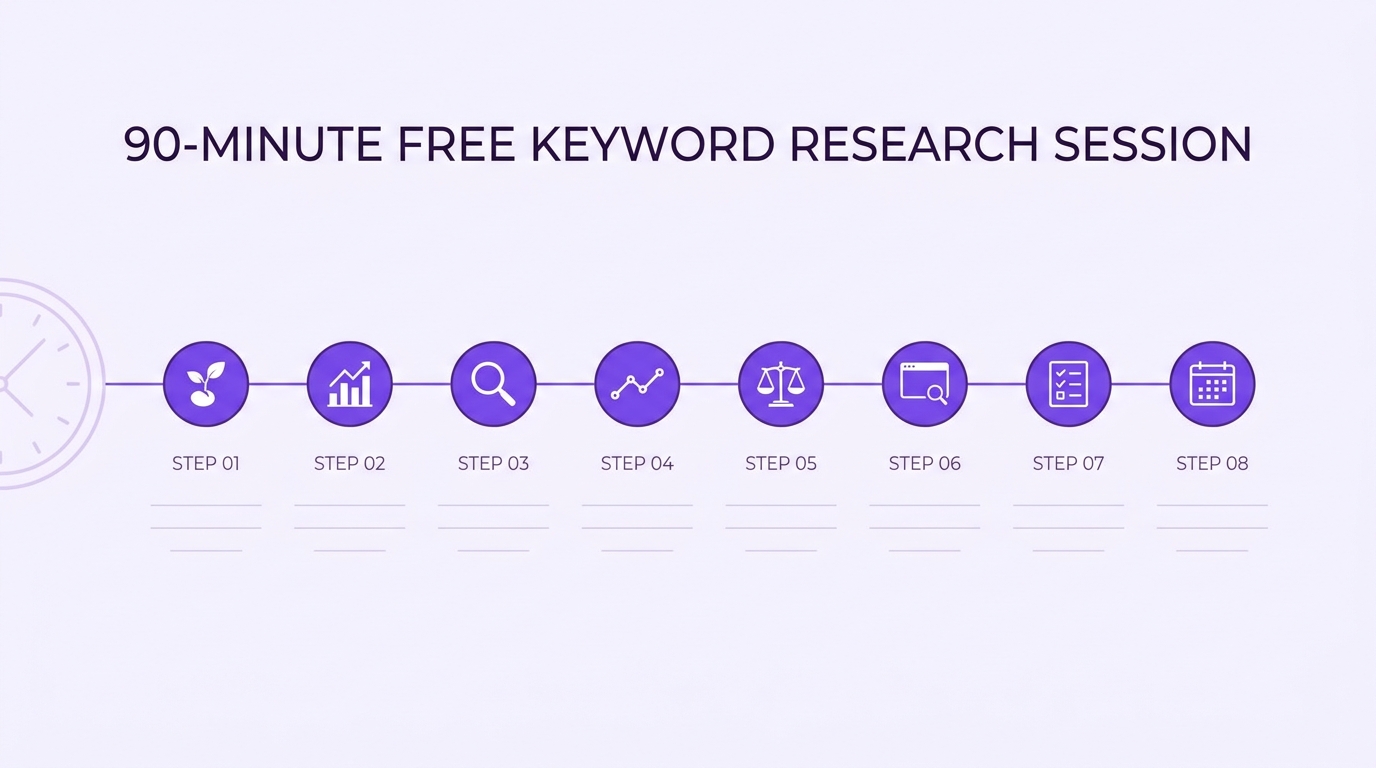
So can I do keyword research for free in a single sitting? Yes, if you budget your time. The plan below uses the sources above in the order that wastes the fewest credits and the least attention. Treat the minutes as a guide, not a rule.
- Define your seeds (10 minutes). Write down five to ten broad topics your customers care about, using the words they use. These become the seed keywords for everything that follows.
- Pull what you already rank for (10 minutes). Open Google Search Console, sort queries by impressions and note every query sitting between positions 8 and 20. These are your quickest wins.
- Expand in Eleven SEO (20 minutes). Run your strongest five or six seeds through the keyword research tool. Record search volume, keyword difficulty and intent, and copy the most promising related keywords into your sheet.
- Check demand over time (10 minutes). Put your top candidates into Google Trends in groups of up to five. Mark which are rising, which are seasonal and which are fading.
- Cross-check size (10 minutes). Run the shortlist through Google Keyword Planner for a second opinion on search volume. If the two sources disagree wildly, trust neither number and lean on the results page instead.
- Read the results pages (15 minutes). Search each shortlisted keyword, scan People Also Ask and note what kind of pages rank. This is where you confirm search intent and spot gaps.
- Score and prioritise (10 minutes). Rate each keyword from 1 to 5 for relevance, demand, winnability and intent fit, then add the scores up.
- Plan the content (5 minutes). Move the top keywords onto the free Content Planner board and assign each one a page.
The scoring step deserves a word of explanation. A keyword with modest demand but a relevance score of 5 and a winnability score of 4 will usually beat a high-demand keyword you have no realistic chance of ranking for. For a newer site, that tilts the list toward long-tail keywords: longer, more specific phrases with clearer intent and fewer strong competitors. They rarely look impressive in a volume column, but together they often add up to more qualified traffic than a single head term.
One practitioner's write-up of this kind of routine, Lilach Bullock's guide to free keyword research, also lands at roughly 90 minutes for a research foundation that guides a quarter of content. Your own timing will vary with the size of your niche, but the point stands: a focused session beats weeks of open-ended browsing.
How to read search volume, keyword difficulty and search intent
Three metrics decide most keyword choices, and free data can mislead on all three if you read it too literally. Here is how to interpret each one.
What is search volume?
Search volume is the estimated number of times a keyword is searched each month in a chosen country and language. Free sources express it differently: Google Keyword Planner shows ranges when your account has little ad spend, Google Trends shows a relative index, and a keyword research tool shows an estimate. Treat every version as an order of magnitude. The difference between 100 and 1,000 monthly searches is worth acting on. The difference between 900 and 1,100 is not.
What is keyword difficulty?
Keyword difficulty is a score that estimates how hard it is to rank organically for a keyword. Every tool calculates it with its own formula, so a score of 40 in one product does not equal 40 in another. Compare keywords inside the same tool and never across tools. Then sanity-check the number against the live results: if the first page is full of large brands with deep, well-linked pages, a low difficulty score deserves suspicion. If it contains small sites with thin pages, you may have found an opening. Eleven SEO's keyword research puts the difficulty score and the live results side by side for exactly this reason.
What is search intent?
Search intent is the goal behind a query, usually grouped as informational, navigational, commercial investigation or transactional. It matters more than raw volume because Google tries to show the page type people actually want. A query like "how to do keyword research" is informational, so a guide wins. A query like "keyword research tool" is closer to commercial investigation, so comparison and product pages tend to rank. This article targets a question, which is why it explains first and recommends second.
Putting the three together gives you a simple rule. A keyword with huge search volume and the wrong search intent is worse than a smaller keyword that matches what your page offers. And a keyword with decent volume, manageable keyword difficulty and a clear intent fit is the one to write about first.
How to stretch Eleven SEO's 10 free monthly credits
Ten credits sounds small until you notice how little a focused research session needs. The pricing section explains that most lookups cost 1 credit, while heavier jobs cost more in proportion to what they cost to run. Keyword gap and the Content Writer cost 2, a keyword list of more than 100 rows costs 2, a keyword overview for a country and language that only Google Ads covers costs 3, traffic trends cost 4 per domain, and the AI Visibility checks run from 2 to 6. Failed lookups are not charged, and the Content Planner, Blueprint, Meta Checker and Google Analytics connection cost nothing.
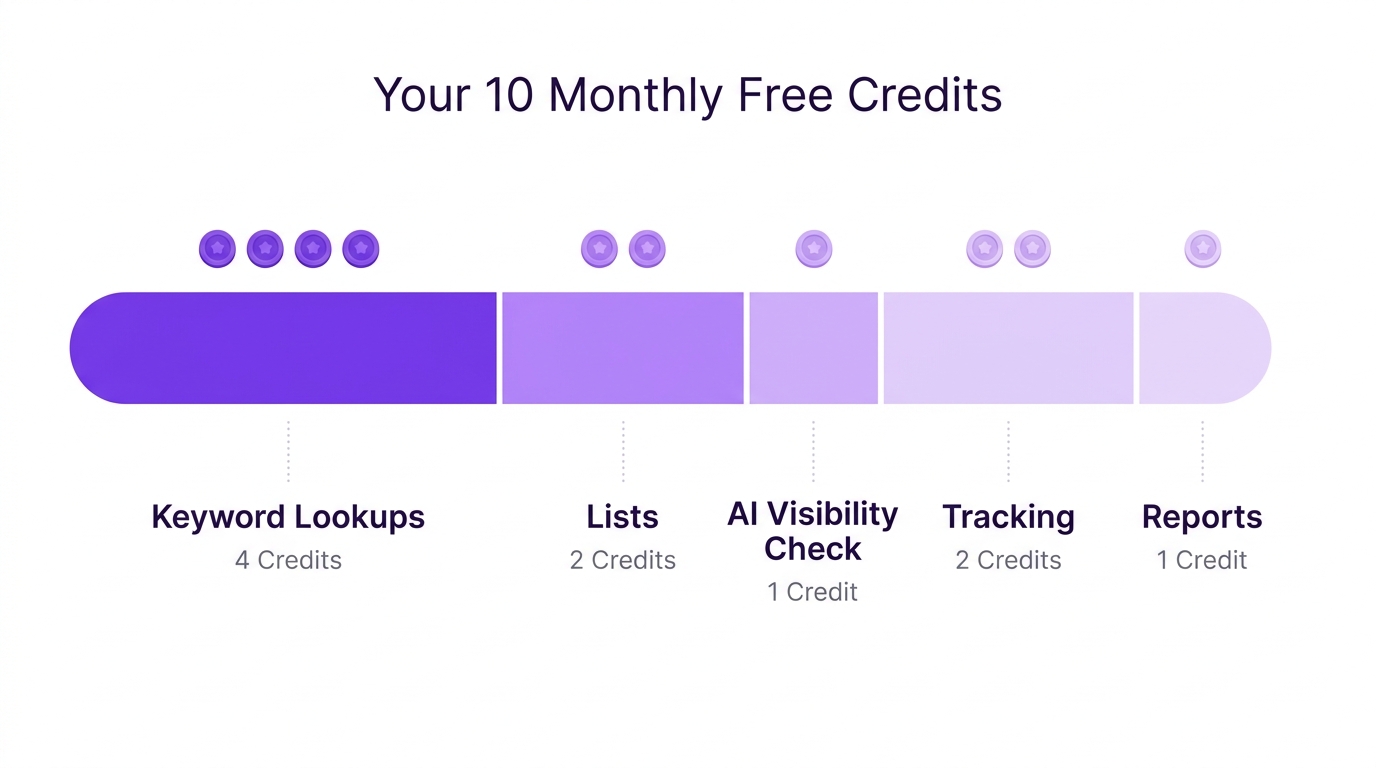
That structure rewards a simple habit: do the free steps first, then spend credits only on the shortlist. Here is one illustrative way to divide 10 credits in a month, assuming standard 1-credit lookups. Check the price on each button before you press it, because costs can differ by country, language and list size.
- 4 credits: keyword overviews for your four strongest seeds, after you have used Google Search Console and Google Trends to narrow the list.
- 2 credits: one expanded keyword list of more than 100 rows for the seed that looks most promising.
- 1 credit: one extra lookup for a keyword you spotted while reading the live results.
- 2 credits: one AI visibility check at the low end of its price range, if you want to see whether AI assistants cite you for a key question.
- 1 credit: kept in reserve for a typo, a retry or a late idea.
Three habits stretch the allowance further. First, use broad seeds and let the related and suggested keywords do the expanding, rather than running many narrow lookups. Second, keep every result in your sheet or the Content Planner so you never pay twice for the same answer. Third, remember that credits reset each calendar month and do not roll over, so spend what is left in the last week of the month instead of letting it expire.
Over a year, the free plan adds up to 120 credits (10 a month for 12 months), plus a free site analysis every month. That is enough to research one focused topic cluster a month, which suits a single blog, a local business or a side project far better than it suits an agency.
When free is not enough: plans and cost per credit
Free research has a ceiling, and it helps to know where it sits. Lilach Bullock's guide is candid that free methods only go so far for brand-new niches, and that paid tools earn their keep if you manage 30 or more sites or compete in crowded fields such as finance or health. The same logic applies to credit-based plans: upgrade when the limit costs you more time than the subscription costs you money.
Eleven SEO's paid plans include the same tools as the free one and differ in credits, number of websites, free site analyses and support level, so there is nothing to relearn when you upgrade. Prices below are in USD per month. The cost-per-credit column is my own calculation (price divided by credits), included so you can compare plans fairly.
| Plan | Price | Credits per month | Websites | Free site analyses | Cost per credit | Best for |
|---|---|---|---|---|---|---|
| Free | $0 | 10 | 1 | 1 | n/a | Trying every tool on your own site |
| Starter | $19 | 225 | 3 | 5 | about $0.084 | A freelancer or a single site |
| Pro | $49 | 775 | 10 | 10 | about $0.063 | Growing sites and content teams |
| Agency | $149 | 2,700 | 50 | 30 | about $0.055 | Agencies and multi-site work |
Three signs it is time to upgrade. You run out of credits before the middle of the month. You want weekly audits or ongoing AI visibility tracking, which the Pro plan is described as having room for. Or you manage several sites and need each one tracked separately. Paid plans are billed monthly through Paddle, you can cancel at any time, and the Refund Policy covers the first 14 days.
Until one of those signs appears, stay on the free plan. There is no prize for paying early, and the habits you build now, such as scoring keywords and logging results, transfer directly to a bigger plan later.
Keyword research for AI search: AI Overviews, ChatGPT and Perplexity
People increasingly put a question to an AI assistant before they open a single search result, and that changes what good keyword research looks like. Prompts to Google's AI features, ChatGPT, Gemini and Perplexity are longer and more conversational than classic queries, which makes them natural long-tail keywords. They also have no tidy search volume column, so the question list you build from People Also Ask, forums and Search Console becomes your best proxy.
A practical free routine looks like this:
- Collect the ten questions customers ask most, using Search Console queries, People Also Ask and forum threads.
- Check the search intent behind each one, then answer it directly in the first sentence or two of the relevant page, so an AI system can quote it cleanly.
- Test whether you are being cited. Eleven SEO's AI visibility tools show whether Google AI Mode, ChatGPT, Gemini and Perplexity cite you. An Instant Check runs one prompt on one engine and lists the sources it used, and the Brand Tracker follows mentions and share of voice against competitors over time.
- Repeat monthly, because AI answers change faster than classic rankings.
On the free plan, an AI visibility check costs from 2 credits, so one or two checks a month on your most important questions is realistic. Heavier tracking, such as the Brand Tracker at 6 credits per run, fits better on a paid plan.
There is one more option if you already work inside an AI assistant. Eleven SEO offers a read-only connector (MCP) that lets Claude or ChatGPT look up your Eleven SEO data. Each lookup uses credits from your plan, just as it does in the app, and the connector cannot change or delete anything. It will not replace judgment, but it does save you copying numbers between tabs.
Common mistakes to avoid with free keyword research
Whenever someone asks can I do keyword research for free, the real risk is rarely the lack of budget. It is misreading what the free data means. These are the mistakes that cost people the most time:
- Treating a range as an exact number. A 1K to 10K range from Google Keyword Planner can hide a tenfold gap. Use it to rank ideas, not to forecast traffic.
- Chasing search volume over search intent. A big number attached to the wrong kind of page produces traffic that never converts, or never arrives because Google shows a different page type.
- Comparing keyword difficulty across tools. Scores come from different formulas. Compare within one tool only.
- Skipping the results page. No metric replaces looking at who ranks and why. It takes two minutes per keyword and prevents most bad bets.
- Spending credits before using the free sources. Google Search Console, Google Trends and the SERP cost nothing. Use them to narrow the list so your credits go to the keywords that matter.
- Researching once and never again. Demand shifts, seasons turn and competitors publish. Revisit your sheet monthly.
So, can I do keyword research for free? Yes, and you should
Free keyword research works because each source covers a different gap. Search Console shows what you already earn, Trends shows when interest rises, Keyword Planner sizes the opportunity, the results page confirms intent, and real conversations supply the wording. A free keyword research tool ties those pieces together so the decisions happen in one place.
The quickest way to start is to create a free Eleven SEO account, add your site and run your first five seed keywords. You get 10 credits every month, one free site analysis and access to every tool, with no credit card required. If your needs outgrow the free plan, you can compare the paid plans and upgrade later. Until then, run the 90-minute workflow, log your results and let the data, not a subscription, make the first decision.
Frequently asked questions about free keyword research
Is there a free keyword research tool?
Yes. Eleven SEO's free plan works as a free keyword research tool, with 10 credits every month, one free site analysis and no credit card needed. Google also offers free options: Google Search Console for your own queries, Google Trends for interest over time and Google Keyword Planner for ideas and volume ranges. Most people get the best results by combining two or three of them.
How do I find keywords for free?
Start with a seed topic, then gather ideas from Google autocomplete, People Also Ask, related searches and forum threads. Next, add data: check search volume ranges in Google Keyword Planner, compare interest in Google Trends and look at your own queries in Google Search Console. Finally, log everything in a spreadsheet and score each keyword for relevance, demand, winnability and search intent.
Is Google Keyword Planner free to use?
Yes, the tool itself is free, but you need a Google Ads account to sign in. You do not have to run ads to use it. The catch is that accounts with little or no ad spend see search volume as broad ranges, such as 1K to 10K, rather than exact numbers. Its competition column also reflects advertisers, not how hard a keyword is to rank for organically.
Is Google Trends good for keyword research?
It is excellent for comparing topics, spotting seasonality and finding rising queries, but it does not show absolute search volume. Google Trends indexes interest on a 1 to 100 scale, where 100 is the peak for the chosen time and place, and terms with very few searches show as 0. Pair it with a source that gives volume estimates and with Google Search Console for real performance data.
What is the best free keyword research tool for beginners?
There is no single winner, because each tool answers a different question. If you own a site, Google Search Console is the most accurate. If you want volume, keyword difficulty and intent in one place, a free keyword research tool such as Eleven SEO's free plan is the easiest starting point. If you want to understand timing, use Google Trends. Beginners usually do best by starting with one all-in-one tool and one Google source.
Is it safe to connect Google Search Console to a keyword tool?
It can be, if the tool asks for read-only access and handles tokens carefully. Eleven SEO states that it requests read-only access to Search Console, stores the connection tokens encrypted and lets you disconnect at any time in Settings. Read the tool's Privacy Policy before connecting any account, and remove access when you no longer need it.
How accurate is free keyword research data?
It is accurate enough to choose between topics but not accurate enough to forecast traffic. Free sources round numbers, show ranges or use relative indexes, and each one measures something slightly different. Treat any single number as an order of magnitude, compare keywords inside the same tool, and confirm important choices by looking at the live search results for the keyword.